
This article explains how to remove "ooo.info" folders that remain in your file explorer even after emptying the trash.
Overview
If you notice "ooo.info" folders still appearing in your file explorer after emptying the trash, this is likely due to an exception during the deletion process. Follow the steps below to completely remove these invalid files.
Resolution Steps
-
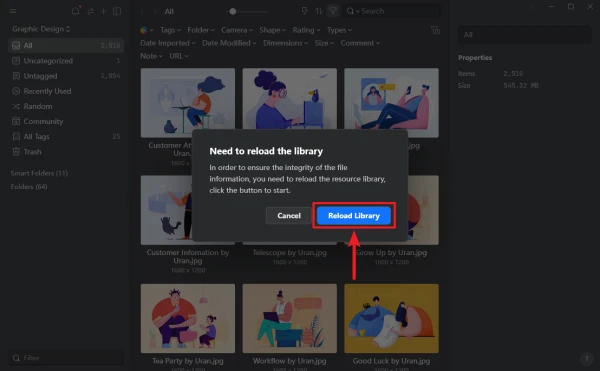
Hold down the Ctrl key while left-clicking on the library name to access the hidden menu, then select "Clear Invalid Content."

-
Click "Reload Library."
-
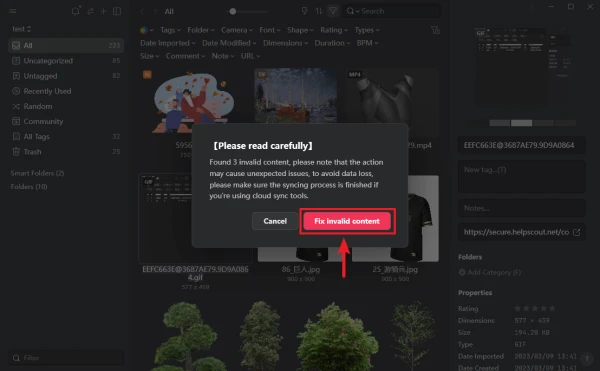
Again, hold down the Ctrl key and left-click on the library name to bring up the hidden menu, then select "Clear Invalid Content."

-
Select "Fix invalid content."
-
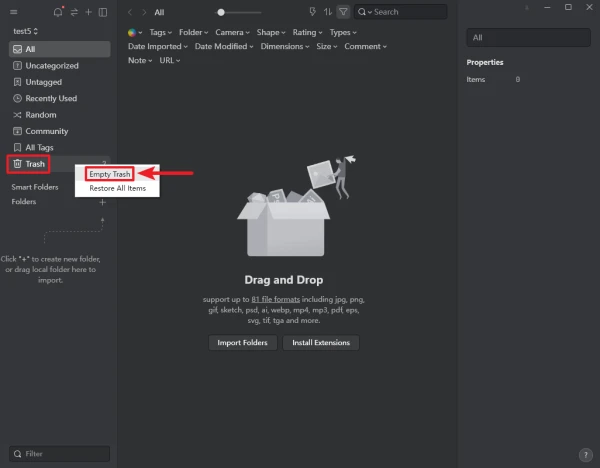
The invalid files will now be moved to the "Trash." Go to the "Trash" to verify the deleted files, then right-click and select "Empty Trash" for permanent deletion.
Important Notes
- When using the "Empty Trash" feature, files are permanently deleted and will not be moved to your system's Recycle Bin.
- The "Trash" in the Eagle library is separate from your operating system's Recycle Bin.