
Eagle fully preserves original CMYK files, but due to differences in color spaces and rendering technologies, these files may display abnormal colors in Eagle. This article will explain the reasons and provide solutions.
Problem Causes
- Color Space Differences: Eagle primarily uses RGB color mode, while CMYK is the standard for the printing industry. The conversion process between these two color modes may lead to inconsistent color representation.
- Rendering Technology: Different applications use different color rendering technologies. Even the same CMYK file may show noticeable color differences when viewed in different environments.
Solutions
-
Use Professional Color Management Tools: If you need precise print output, it's recommended to use professional color management tools for proofreading and conversion to ensure color accuracy.
-
Update Eagle Software: Make sure you're using the latest version of Eagle. We continuously optimize color parsing technology, and newer versions may improve color difference issues.
- Close Eagle software normally
- Visit the official website to download the latest version
- Manually install the update
-
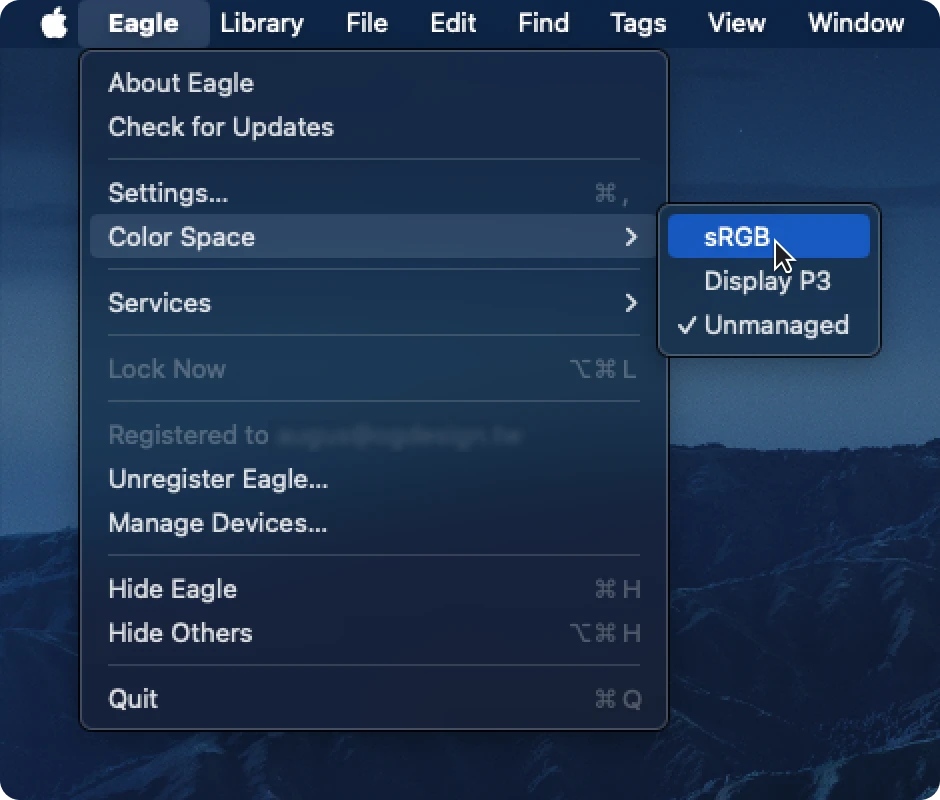
Adjust Color Management Settings: Try different color management settings in Eagle:
-
sRGB: This is a widely used standard color space, suitable for web content and most display devices
-
Display P3: This is a wider color space that provides richer color representation, suitable for new display technologies
-
Unmanaged: When this option is selected, Eagle will not perform special color processing, but will directly use the system's current color profile to display images
-
Important Notes
- If you haven't manually adjusted these settings, Eagle software defaults to "Unmanaged" configuration.
- Eagle will not modify the original files. All color differences only exist in preview display and will not affect the quality of original files
- Choosing appropriate color space settings can help improve color consistency in display
- For professional printing work, it's always recommended to perform final color proofreading in professional software