Founder’s column
Inspiration isn’t copyingWhy do good designers need to learn from others even more?
In the years when I was starting to build Eagle, I used to sort designers, roughly, into two types: the “gifted” kind and the “hardworking” kind.
It was never a rigorous classification, of course. It was just an impression I formed after watching designers work for a long time.
Some people are born with a strong sense of beauty and creativity, and seem to produce stunning work without needing many references. Others make a habit of studying other people’s designs in depth: they keep collecting examples, compare different approaches, and slowly form their own ideas.
Interestingly, every now and then I meet designers who look down on “collecting inspiration.” If they can create on their own, they ask, why study other people’s work at all? Some even believe that referencing someone else’s design is, to some degree, an admission that you lack originality.
I’ve never really agreed with that.
Especially when we’re not talking about pure art, but about UI, UX, product design, or any design work that has to solve real problems.
Design doesn’t end with a gut call of “I think this is better.” We’re dealing with different users, different contexts, and all kinds of constraints.
There are so many people out there solving similar problems in different ways. Why would we deliberately ignore what they’ve learned?
If anything, I think the more you want to make good design, the more curious you should stay, and the more willing to see how other people think.
For me, looking for inspiration has never been about copying. It’s about giving my own thinking more possibilities.
Inspiration doesn’t come from nowhere. It comes from experiences connecting
I’ve always found “inspiration” fascinating.
Two designers doing the same job, but with different upbringings, different products they’ve used, and different life experiences and values, will often come up with completely different solutions to the same problem.
Why?
Because each of us has built up a lot in our heads: things we’ve seen, used, understood, or that left only a faint impression.
Most of the time these experiences have nothing to do with each other. But when a problem comes up, a few of those ideas suddenly link together, and a new possibility appears.
This is what I take inspiration to be: the moment when scattered experiences form a new connection.
Here’s an example.
You’re designing an image management tool, and you’re stuck on how to handle a certain workflow.
If you keep staring at other image management apps, you may find a few decent answers. But if you’ve used lots of different kinds of products, you might suddenly remember that an e-commerce back office, a code editor, or even a tool that seems completely unrelated once solved a similar problem in a clever way.
In that moment, you may find a path you’d never considered.
So I don’t think looking for inspiration means a person has no ideas of their own.
Quite the opposite: we keep exposing ourselves to new things precisely so that our minds have more experiences to connect.
If someone only ever works with the same kind of product and the same way of designing, over time it’s easy to mistake the existing approach for the only one.
And what’s really fun about design is often discovering that things don’t have to be done that way.
Don’t just study similar products: the story of Eagle’s tag picker
I want to share a real case from building Eagle.
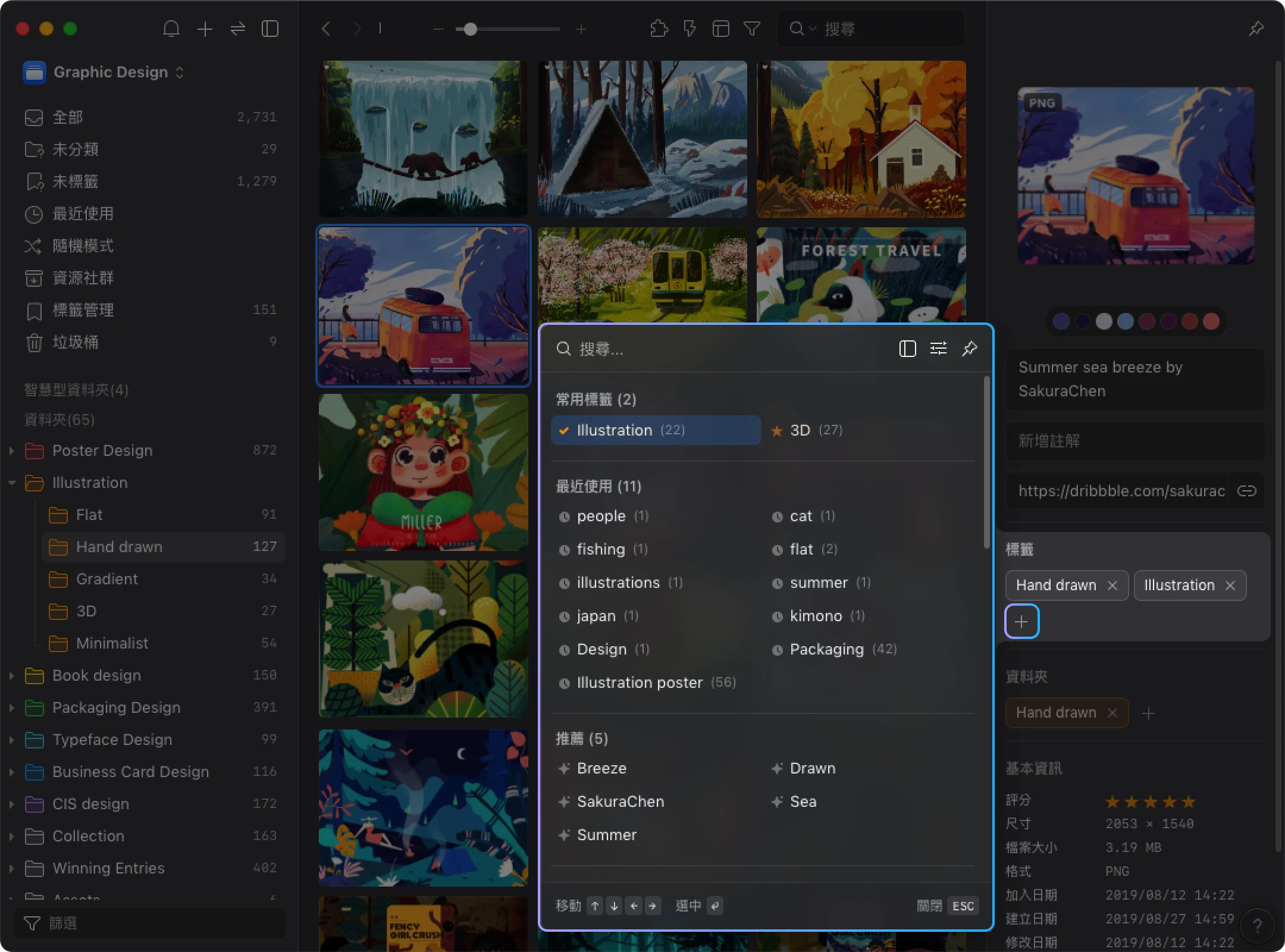
Early on, when we were designing the tag picker, we faced what looked like the most ordinary feature imaginable: the Tag Input.
I’m sure many of you have used one.
You type a few letters, the system shows matching tags, and you pick one. If nothing matches, you create a new tag.
There were already very mature approaches on the market. If we had simply followed them, nothing much would have gone wrong.
But what I was thinking at the time was: is this interaction everyone takes for granted really right for Eagle’s users?
Why should choosing a tag require typing?
For one thing, a large share of Eagle’s users are visual creatives.
Not everyone uses the keyboard as their main tool.
A traditional Tag Input usually treats typing as the starting point for everything. But if someone prefers the mouse, could they browse and pick tags directly, the way they would in a menu?
And the other way around: if someone is very comfortable with the keyboard, could they work even faster?
Say there’s a tag called Google Material Design.
Does the user have to type the full name every time, or start typing from the beginning?
If they type only GMD, can the system understand what they’re looking for?
That got us looking at Fuzzy Search, which is common in code editors. For many developers, finding a command or file by typing a few key letters is second nature.
So why couldn’t that experience work in an image management tool?
When the user presses Enter, what do they actually want?
Another problem that’s easy to overlook is the conflict between adding a new tag and selecting an existing one.
Say the user already has a tag called UI Design.
They type UI and press Enter. Should the system create a new UI tag, or select the existing UI Design?
If you just follow the simplest input box logic, you can easily end up with a pile of tags the user never meant to create.
But if the system decides for them, it may guess wrong.
This isn’t a problem you can solve just by making the interface look nice.
You have to think about what the user intends, which candidates are available, and how to balance different ways of working.
Can we offer a useful answer before the user even searches?
We also explored a few other directions.
For example, an image carries a lot of information on its own.
It may have a file name and distinctive visual features, and it may closely resemble other images the user saved in the past.
So could the system use that information, along with past tagging habits, to recommend the tags the user is likely to need ahead of time?
And when the user starts typing, could it use the words in the file name to help them find what they want faster?
None of these ideas stayed at the research stage. We built them into Eagle’s tag picker, along with many other details.
From Tag Input to Eagle’s tag input window
Five capabilities built into Eagle
- 1
Mouse and keyboard alike
Browse and click like a menu without typing; keyboard users can work the whole way through too.
Inspired byE-commerce back offices: managing large numbers of items
- 2
Fuzzy Search
Type just GMD to find Google Material Design.
Inspired byCode editors
- 3
Create or select
Type UI and press Enter: create UI, or select UI Design?
Inspired bySearch systems: predicting intent
- 4
Recommending tags in advance
Offers answers before you search, based on visual features, similar saved items and past tagging habits.
Inspired bySearch systems: predicting intent
- 5
Using words from the file name
As you start typing, words in the file name help with search and recommendations.
Inspired bySearch systems
But I’m not sharing this story to show off how great Eagle’s tag feature is.
I want to make one point:
If we had only studied the Tag Input in other image management apps, we would most likely have built just another, similar Tag Input.
What actually gave us different ideas was studying how large e-commerce back offices manage huge numbers of products, how code editors search quickly, and how other systems predict what users intend to do.
They aren’t the same kind of product, but they may face similar core problems.
Once you start to understand the nature of a problem, instead of only looking at what other people’s interfaces look like, you have a better chance of combining experience from different fields into a solution that fits you.
There’s a phrase for this that I love: learning by analogy.
Seeing more doesn’t mean understanding more
At this point, I also want to add a word of caution.
I encourage designers to look at and study a lot, but that doesn’t mean you should save every good-looking thing you see, and it certainly doesn’t mean the more you save, the better you are.
Take Dribbble: it’s full of great design work.
Some shots are genuinely beautiful, with striking composition, color and detail.
But if you think carefully about how they would actually work, you may find they don’t suit a real product at all.
In a carefully crafted showcase image, an interface can look complete. But what if the data goes from ten records to ten thousand? What if people use a mouse instead of touch? What if the content runs longer than expected?
A design that looked beautiful can run into trouble quickly.
That doesn’t mean the work has no value.
It may be well worth studying for its visuals, color or layout. You just need to be clear about what you actually want to learn from it.
A beautiful piece of work isn’t necessarily good product design, and a good reference doesn’t have to be a successful piece of work.
I think studying failed designs can teach you just as much.
Sometimes seeing how someone else got something wrong helps you understand where the problem lies.
So I’ve always felt the habit worth building isn’t simply “collecting inspiration.” It’s constantly encountering new things, understanding them, and turning that experience into your own ability.
Look more, play more, make more, think more.
If you’ve saved thousands of beautiful images but never thought about why they work or where they don’t make sense, what you’ve built up may just be visual preferences, not necessarily the ability to solve problems.
What separates borrowing from copying?
I don’t really believe practical design can be original in a way that’s completely detached from past experience.
At least in my own work, many ideas that look new turn out to carry traces of something experienced before.
You once used a product, saw an interaction, understood a problem. When a new need comes up, you suddenly realize some of those approaches can be recombined to solve what’s in front of you.
To me, that’s a natural part of creating.
But borrowing isn’t copying.
If you lift someone else’s work wholesale just because it looks good, without understanding why they designed it that way or even considering the context it was made for, I don’t think that’s a design method worth encouraging.
Borrowing that’s actually valuable means understanding why they chose that solution.
What problem were they trying to solve? Who were their users? What constraints did they have? Why did they choose A and not B?
Then look back at your own product.
Are we facing the same problem? What’s worth learning? What has to change? Could we even find a new solution by combining several different approaches?
Of course, when you actually create, you still need to respect other people’s work and intellectual property. Understanding a design method doesn’t mean you can copy its specific execution.
But I don’t want designers to stop studying the world outside just because they’re afraid of being told they “referenced someone else.”
That isn’t originality. It’s choosing to narrow your own view.
In the age of AI, the way we find inspiration has changed
When I looked for inspiration in the past, I used Pinterest a lot.
Say I wanted to study a certain style. I might first find a few Boards that other people had already curated well, check that the content was good, and then use a tool to save them to Eagle in bulk.
What next?
I didn’t keep every image. I picked through them quickly.
I’d delete a large number of images that didn’t fit, and keep only the ones I actually found valuable.
The process is actually quite interesting.
Content that someone else spent a long time collecting can become my starting point for exploring a topic. But I don’t have to take all of it. I use my own judgment to gradually narrow it down to what really suits me.
Now that we’re in the age of AI, that process has changed a lot.
I can ask an AI Agent to search for a certain kind of design, not limited to any particular platform, straight across the web.
I can also ask AI to generate images in different directions.
Say it collects or generates five hundred or a thousand candidates for me at once. I don’t have to study each one carefully.
I can quickly delete most of them and keep only the few that match what I have in mind.
Then I hand those results back to the AI and tell it:
“This is the direction I want. The ones I just deleted don’t fit. Based on what I kept, help me explore other possibilities.”
You can even go a step further and work out clearer filtering rules, so the AI finds things more accurately in the next round.
Exploring, searching and organizing used to take a lot of my own time. Now AI can handle a large part of it.
But here’s the interesting part: the cost of getting candidates has dropped, yet that doesn’t mean we no longer need our own judgment.
AI can produce huge amounts of content quickly. But if you don’t know what problem you’re solving, aren’t clear on who your target users are, and can’t judge which results actually meet the need, then however many images it produces, you may just end up with a pile of things you can’t use.
I felt this strongly when I recently rebuilt the Eagle website.
Before I started researching visual styles, what I cared about more was: what does this page actually want people to understand? What kind of product feeling do we want to convey?
With that direction in place, the visual research that follows has something to judge against.
AI can help explore, offer candidate solutions, and even build prototypes. But which one fits best, and which direction is worth pursuing, is still for us to think through.
As I see it, AI hasn’t made looking for inspiration unnecessary.
It just lets us explore more possibilities, faster.
Why do I still keep things worth referencing?
This was also one of the main reasons I started building Eagle.
Human memory is less reliable than we think.
Sometimes I’m working on a project and suddenly remember a great interface I saw years ago.
I remember roughly what it looked like, and that I found it interesting at the time.
But where is it?
Which product? Which website? Where did I see it in the first place?
Often I just can’t remember.
Even if a vague impression is still there, that doesn’t mean you can describe it precisely, let alone hand it to a colleague to discuss or give it to AI as a reference.
So I’ve always thought that when we come across material that interests us, is worth studying, or might be useful again someday, keeping it makes perfect sense.
Not because every image has a use right now, but because at some point you may need to find that old idea again.
For me, the most practical way Eagle helps is that when I suddenly remember an image I once saw, I can usually find it again quickly.
Sometimes I can also find where I saved it from, other assets I collected around the same time, and even more similar references.
That way, experience built up in the past doesn’t simply fade away with time.
And as AI gets better, I no longer have to carefully tag every image the way I used to.
Just saving assets into categories that fit my own habits, and later using search and AI analysis to find them again, already takes away a lot of the organizing burden.
I’ve always wanted collecting to be simple, not another time-consuming chore.
After all, a tool should help us focus on what really matters.
Look more, play more, think more. Don’t copy more
Let’s go back to the question I raised at the start.
Does a capable designer really need to reference other people’s work?
My answer has always been clear: yes.
Not because you aren’t good enough, and not because every problem has to be solved by looking at others.
It’s because admitting there’s still a lot out there worth learning is itself an important attitude toward work.
Especially in product design.
The problems we face rarely have a single answer. Different users, contexts and constraints can all make a reasonable solution stop fitting.
If you never study other products, how would you know how many ways others have already tried to solve the same problem?
And if you don’t understand the reasoning behind those solutions, how can you judge what actually makes your own design good?
That’s why I keep encouraging young designers to look more, play more and think more.
Good design is worth studying, and so is bad design. Products in your own field are worth studying, and products from seemingly unrelated fields can offer unexpected inspiration too.
You don’t need to treat other people’s answers as the right answer, and you don’t need to follow a piece of work just because it looks beautiful.
The more you see and the more deeply you understand, the better your chance, when it’s time to make a real decision, of knowing when option A fits, when option B fits, and even of thinking of an option C no one has tried yet.
AI makes it easier to come across a huge range of ideas, but I don’t think that principle has changed.
It can help us search, generate and explore, but it can’t understand for us the problem we actually want to solve.
In the end, inspiration has never been just the images you save.
What really has value is the understanding that stays in your head after you’ve seen these things, and the you who, later on, can recombine that experience to solve new problems.
So look more, play more, think more.
Not to copy a little more, but to give yourself more options.