

How to organize design assets and references: A graphic designer’s guide
A file can be easy to store and still be hard to use later. A poster reference, for example, may be worth keeping because of how it groups a complex schedule, while the poster you are producing for a client belongs with the project files, revisions, approvals, and delivery record.
A useful organization system keeps those jobs distinct. Keep production records with the project that created them. Build a longer-term reference and asset library around what you may want to find across projects, and save enough context to remember why an item mattered. You can begin with material from one current project rather than reorganizing everything you own.
Why collecting and organizing design references and assets matters
Collecting gives useful discoveries somewhere to persist after a project ends. Organizing gives you a way to recover both the material and the observation that made it useful.
If you do not have a collection yet, project research can disappear as soon as the tabs close. You may have compared several poster layouts, noticed a strong way to separate dates from session details, and then moved on. Keeping a small number of references with a short explanation lets that work become a starting point for a later brief. It does not replace fresh research: a new audience, format, subject, or constraint can still call for new examples.
If you already save a lot, the failure may be different. A screenshot can remain on your drive while its source, purpose, and context fade. A filename such as screenshot-174.png tells you that the image exists, but not what you expected to learn from it or how to find it when the same design problem returns.
The observation is therefore as important as the saved item. An editorial spread might be worth keeping because a long headline is balanced against a narrow text column, not simply because the page feels polished. That specific relationship gives you something to compare with another layout later.
The collection itself does not guarantee faster work or better design. Judgment develops through looking closely, comparing alternatives, testing ideas against real requirements, and deciding what does or does not transfer. Organization supports those activities by making prior observations available again.
Start small enough that every saved item has a reason to be there. If your existing project folders already help you recover everything for a specific job, keep using them. Add a separate reference library when you need to retrieve ideas across projects without remembering which client or assignment first led you to them.
Understand why each asset is worth keeping—and how you might use it
Before choosing folders or tags, identify the role of the material and what you need to remember about it. A client brief is evidence of requirements. A reference is something to study. A working file has production dependencies. An asset intended for use also carries source and usage conditions.
| Role | Typical material | What to preserve |
|---|---|---|
| Client information and requirements | Brief, supplied copy, brand guidelines | Project context and which information is current |
| Reference | Event poster, editorial spread, identity presentation | What you noticed, where it came from, and what may be useful later |
| Asset intended for use | Photo, icon, font | Source, suitability, and the applicable conditions for using it |
| Working file | Editable poster or brochure layout | Project, item, revision, and linked dependencies |
| Preview or delivery | Review PDF, print PDF, social image | Purpose, represented revision, and approval or delivery status |
The role table is only the first pass. For references in particular, the more useful question is what design decision made the item worth saving.
Record the design relationship, not just the visual attraction
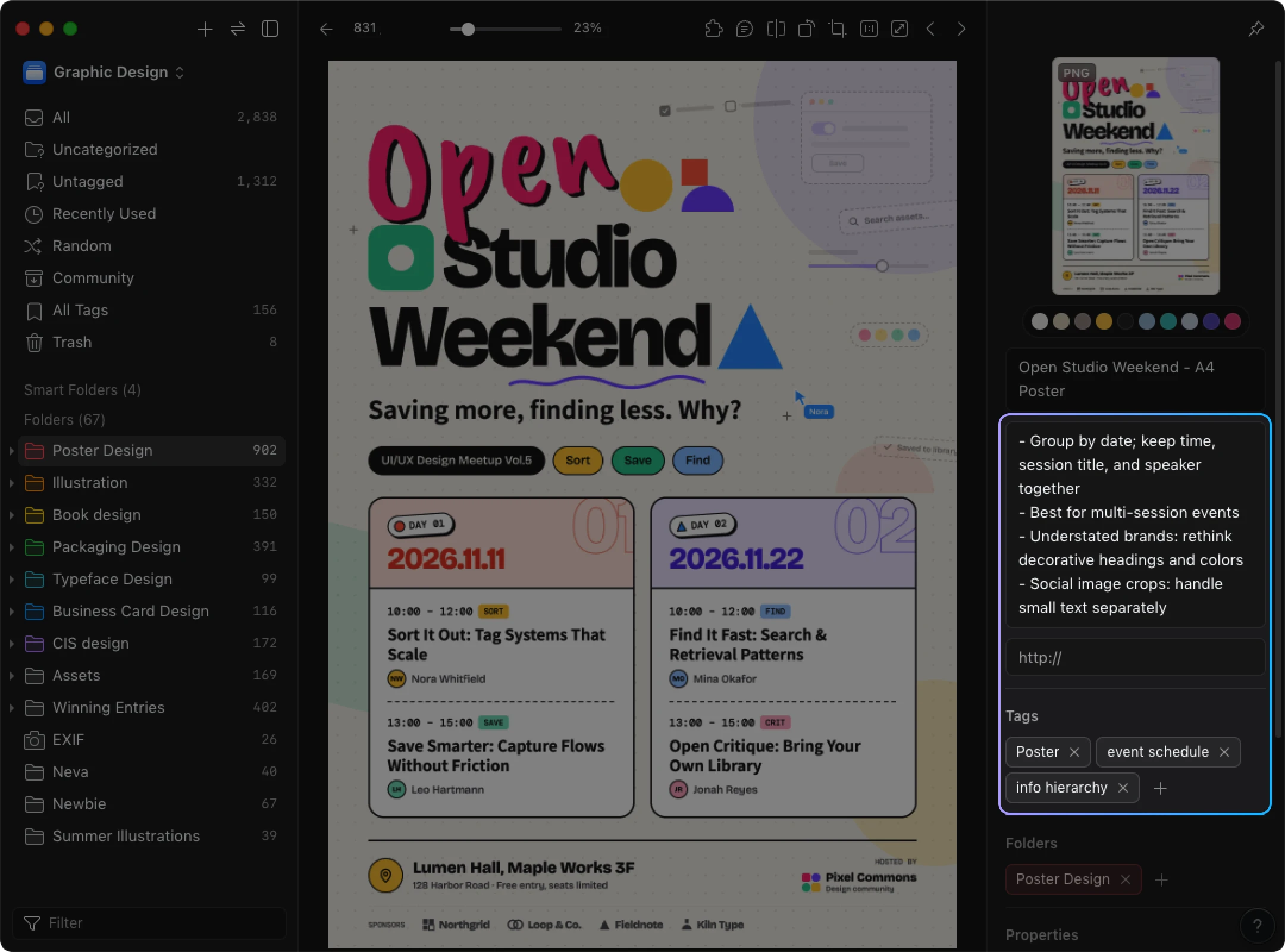
Take the Open Studio Weekend teaching poster used through the next sections. A large decorative event title sits above the schedule. Two date headings divide the event into days. Each date contains two sessions, and each session keeps the time, title, and speaker together. A shared venue appears in the footer.
The useful lesson is more precise than “good typography.” The date headings let a reader identify a day before scanning individual sessions. Keeping time, session title, and speaker adjacent reduces the need to match related information across separate lists. Different type sizes also give the event title, date headings, and session details different levels of emphasis. Adobe’s layout guide describes grouping related elements and using typographic emphasis to express hierarchy; the poster here is an editorial application of those principles, not a measured readability test.
A useful note for the collection might therefore be:
That sentence captures a relationship you can deliberately look for again.
Keep the transferable part separate from the rest of the design
A reference rarely transfers as a complete package. The Open Studio Weekend poster may help when you need to structure a lecture series or workshop program because both contain grouped event information. The schedule relationship can be worth studying even when the new project needs a completely different visual identity.
The decorative title lettering, for example, may not suit a calmer lecture-series identity. Its colors may also be irrelevant to the new brief. And a dense block of small session text that works on a full poster does not establish that the same treatment will work in a small social image. Save the relationship you want to study, then treat visual style and format constraints as separate decisions.
Assets such as photos, icons, and fonts add another boundary: something can be useful to examine without being available for use in a deliverable. Keep the source and applicable terms with material you may place in finished work. Crediting the creator does not itself establish permission. Check the conditions for the actual asset and intended use. As one narrow example, Adobe Fonts’ licensing FAQ distinguishes rendered artwork from giving a client access to fonts for editing; direct font access requires the client’s own license. That is an Adobe Fonts condition, not a rule for every font source.
Ask what a new item adds to the collection
A second event poster is not automatically redundant, but it should add something you can name. Perhaps it groups multiple venues, accommodates longer speaker names, or handles a denser schedule without losing the distinction between date and session. Those differences give you another approach to compare.
You also do not need to predict an exact future project for every item. If an image has an unusual relationship you want to understand, save the concrete observation. “The image interrupts the headline without obscuring the reading order” is enough to justify later investigation. It is more useful than inventing a project that does not exist yet.
Build categories around how you’ll look for things
Choose categories by working backward from retrieval. The question “Where is the latest brochure revision for this client?” needs a different structure from “What references do I have for organizing several event sessions?”
Project records are usually retrieved through the client or job. Long-term references may be retrieved through format, design problem, or application.
| Retrieval cue | Example | What it helps you recover |
|---|---|---|
| Project or client | Lecture series | Materials and decisions tied to one job |
| Content type | Poster | Examples in a particular format |
| Design problem | Information hierarchy | Ways to give information different levels of emphasis |
| Application | Event schedule | Designs that organize dates, sessions, and related details |
For the Open Studio Weekend reference, Poster can serve as the main home, while information hierarchy and event schedule provide additional routes back to it. If you usually begin from a design problem, you may reverse that emphasis and make hierarchy the main category instead. The useful structure is the one that matches the questions you are likely to ask later.
Give one item several retrieval cues without duplicating the file
A poster can answer both a format search and a design-problem search. That does not require multiple physical copies. Tags or a searchable index can point to the same saved item from more than one angle.
If your system only offers folders, give the item one stable home and keep secondary cues in a searchable note or index. The goal is not to force every relationship into the folder tree.
Test the structure with a few real items. Suppose one brand identity reference is useful because it shows a compact logo hierarchy, while a brochure is useful because it handles dense information. If you want examples of information hierarchy, your system should give you a way to reach both even though their formats differ.
Split or merge categories based on retrieval, not neatness
Broad categories work until they make you inspect too much unrelated material. Inspiration may be perfectly adequate for a small collection. If you repeatedly browse unrelated work just to find posters, splitting out Posters has a clear retrieval purpose.
Overly narrow trees create the opposite problem. A path such as Posters > Events > Talks > Two speakers > Blue asks you to make many placement decisions and can separate references that solve the same design problem. Keep stable categories broad enough to use. Add color or another detail as a secondary cue only when you actually search by that detail.
There is no required folder depth or tag count. If two categories contain almost the same material and you cannot predict which one you would use, combine them. If a single category repeatedly returns too much unrelated material, split it along a distinction that helps you rule things out.
Put your system into practice: Folders, file names, tags, and notes
Once the classification logic is clear, assign different jobs to folders, names, tags, and notes. Folders give an item a stable home. File names identify the item or revision. Tags provide extra retrieval paths. Notes hold reasoning, source context, and limits that do not fit comfortably in a label.
Not every file needs all four. A client brief may only need a reliable project location and clear revision. A reference is more useful when its source and the reason you kept it survive with it.
Keep the project archive and the long-term library separate
A project folder should preserve the material needed to understand, produce, review, and deliver that job. For a lecture-series project, one workable structure is:
Lecture-series/
  Client-information/
  References/
  Assets/
  Working/
  Previews/
  Delivery/
Client-information can hold the brief, supplied copy, and feedback. References contains research selected for this project. Assets contains material intended for the design, together with source and usage information where relevant. Working contains editable files. Previews and Delivery remain separate so a review export is not mistaken for the file actually sent. Keep an approval or delivery record that identifies what was sent and the basis for treating it as approved.
The long-term library has a different responsibility. It holds references and reusable assets that may matter in another job. The Open Studio Weekend poster belongs there because its schedule structure may remain useful across projects. You can refer to it from the lecture-series project, but it does not become a working file or an approval record. Official working files, feedback, and deliveries stay with the project.
Name working files for the differences you must recognize
Production files often need project, item, and revision information:
lecture-series_poster_v03.inddlecture-series_poster_v03_review.pdflecture-series_social_1080x1350_v03.png
The dimensions in the social image name simply distinguish that output size; they are not a platform rule. A delivery file name should identify its intended output, while the delivery record captures the exact file, sent date, and approval basis. A higher version number only identifies a later revision. It does not establish approval.
References need different naming logic. open-studio-weekend_schedule-reference.jpg identifies why the image is in the library without pretending it is a revision of your own project. Keep the original creator or title when needed for identification, and put longer observations in the note rather than forcing them into the filename.
Production files can also depend on external assets. InDesign, for example, may link to graphics stored elsewhere. Moving or renaming a linked asset during cleanup can leave the document unable to find it. Check linked-file relationships before reorganizing production material, and use the application’s link-management tools if you need to reconnect a file. Adobe documents the process in Update, restore, and replace links.
Save short retrieval cues and keep the reasoning in the note
A complete record for the Open Studio Weekend reference could look like this:
- Home: Posters.
- Name: Open Studio Weekend — schedule reference.
- Tags:
information hierarchy,event schedule. - Note: “Dates divide the schedule; time, session, and speaker stay together within each date. Useful for comparing multi-session event layouts. Reconsider decorative title lettering and colors for a restrained identity. Small session text needs a different treatment for small social images.”
- Source: For collected work, record the original creator and page URL. For your own material, record the original file location. Keep applicable usage conditions with assets you intend to place in deliverables.
The tags are compact retrieval cues; the note preserves what is useful and where the reference stops being a good fit. A note such as Nice poster loses that distinction. Moving the whole explanation into the filename makes identification harder without giving you a better search structure.
If you use Eagle for a personal visual library, the same division can be represented there. Eagle’s folder controls support creating a Posters folder and categorizing an existing image. The Inspector includes fields for tags, Notes, and URL; the Inspector guide documents those fields. For this saved reference, add information hierarchy and event schedule, place the observation in Notes, and check the URL against the original source when the item came from the web. This is a way to describe a reference already saved in Eagle, not a procedure for moving production files into the app.
Bring your collection into your next design project
Use the new brief to decide what to retrieve. The collection gives you candidates to examine; it does not decide what belongs in the new design.
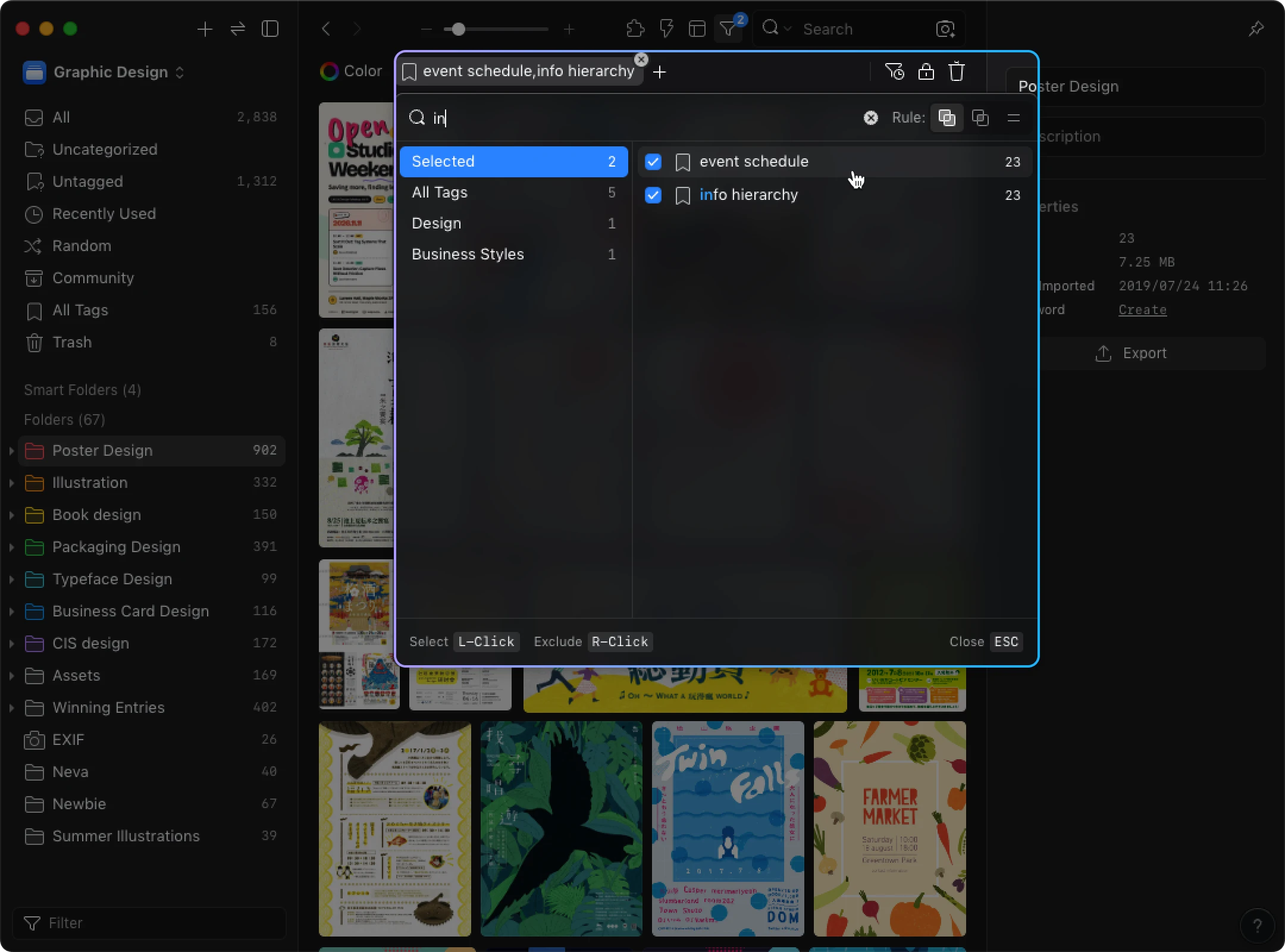
For the lecture-series poster, the current problem includes several dates, multiple speakers, a registration route, a restrained identity, and a smaller social application. The two cues already attached to the Open Studio Weekend poster—information hierarchy and event schedule—are therefore relevant places to start.
In Eagle, you can open the funnel filter, choose Tags, select both tags, and set the logic to All. Eagle’s Search by tags guide describes All as the intersection that returns items containing all selected tags. Begin from a view that contains the references you want to search so another folder or scope does not unintentionally narrow the result.
Retrieval is only the first step. Read the saved note and compare it with the new requirements. Grouping each date with its sessions may transfer well to the lecture series because the reader still needs to connect times, titles, and speakers. The decorative title treatment and original colors are less relevant to a restrained identity. The dense session text also raises a format question that the reference does not answer: how should the structure change in a small social image?
A second reference might show one speaker per image. That could be more useful for individual session announcements but less useful for the complete-series overview. You might therefore explore the grouped schedule for the main poster and use a different reference set for the social cards. The point is to compare relationships and constraints, not to copy a reference as a complete design direction.
If the collection has no strong examples of image treatment, long speaker names, or small-format schedules, research those gaps specifically. New research remains part of the process; the library helps you ask a narrower question because some earlier decisions and observations are already available.
Before you move from reference research into production, make sure you can state what each chosen item contributes and what you are deliberately not carrying over. If the answer is still only “the style,” return to the actual hierarchy, grouping, image relationship, or other design decision. If a photo, font, icon, or other asset will be used in the finished design, check its conditions again for this project.
If you have no library yet, use the same method on the current project. Save the few references that explain a useful decision, add the observation and source, and let those records become the first pieces of the collection.
Keep your library useful as your work evolves
A library stays useful when you adjust it in response to real retrieval and use. Check whether you can find items using the words you remember, understand why you saved them, add new material without a long classification debate, and maintain the structure without turning organization into a separate project.
Vocabulary is one place where use exposes problems. Suppose you search for event information, but earlier references were tagged only with event schedule. Review whether those phrases mean the same thing in your own system. If they do, choose a consistent term and update the affected records, or preserve the alternate phrase in a searchable note if that helps your setup. This is a manual vocabulary decision; do not assume the tool will infer synonyms for you.
Use the same evidence from everyday work to simplify categories. Merge categories that have become indistinguishable. Add to a note when a project reveals a new limitation. If you use an inbox for material you cannot assess immediately, choose a natural return point—after a research session or when closing the project, for example—rather than imposing a fixed schedule that does not fit your work.
Close the project without collapsing its record into the reference library
When a job ends, preserve the files that explain what was delivered and approved, along with the working material needed to understand or revise the job. Select long-term references separately. Before deleting something that looks duplicated, check whether it is actually an earlier revision, a delivered export, or a linked asset. Similar appearance does not prove that two files play the same role.
Back up both the project archive and the library, including notes and organizational data. Keep a recoverable copy separate from the working files and make sure the backup process preserves what you would need to restore. Synchronization alone is not an independent recovery copy when edits or deletions propagate to the synchronized location. For an Eagle library, the official Back up libraries guide covers copying the whole library to another device and using backup tools. Copying only selected images would leave the rest of the library data outside that backup.
Turn recurring gaps into future research topics
During the lecture-series project, the small social format was an immediate research gap. After the project, ask whether that problem is likely to recur in your work. If adapting dense event information to smaller formats comes up repeatedly, it may deserve deliberate collection over time.
You could compare several approaches: one session per card, a short overview followed by individual cards, or a reduced schedule that points to full details elsewhere. For each reference, record how it handles the amount of information and what action the viewer must take next. That builds a set of comparable approaches rather than a miscellaneous folder of social images.
If the need was unusual and is unlikely to return, keeping the solution in the project record may be enough. Not every difficulty needs a permanent category or a new collection goal.
A practical next step is small: choose one reference from your next research session, write down what it helps you understand, and give it the cues you would use to find it again. When a related brief arrives, try retrieving it. The result will show you what to keep, rename, merge, or add next.
Related Posts