Eagle 4.0 Build 22: Plugin Enable/Disable Management, Major Performance Improvements, AI Action Coming Soon
Build 22 delivers three key updates: a new plugin enable/disable feature that gives you more flexible control over installed plugins; several under-the-hood performance optimizations that make GIF playback, color analysis, and high-resolution image browsing noticeably smoother; and the foundational work needed for the upcoming AI Action plugin.
This release also addresses several issues affecting everyday use, including video hover preview crashes, HEIC thumbnail anomalies, and duplicate service plugin launches. Here's the full rundown.
✨ Plugin Enable/Disable
Previously, installed plugins could only be kept or removed entirely — there was no convenient way to temporarily turn off a plugin you didn't need at the moment.
With this update, we've added the ability to enable or disable any installed plugin without uninstalling it. You can freely decide which plugins stay active and which ones take a break. When you re-enable a plugin, all its settings are preserved — no reinstallation or reconfiguration needed.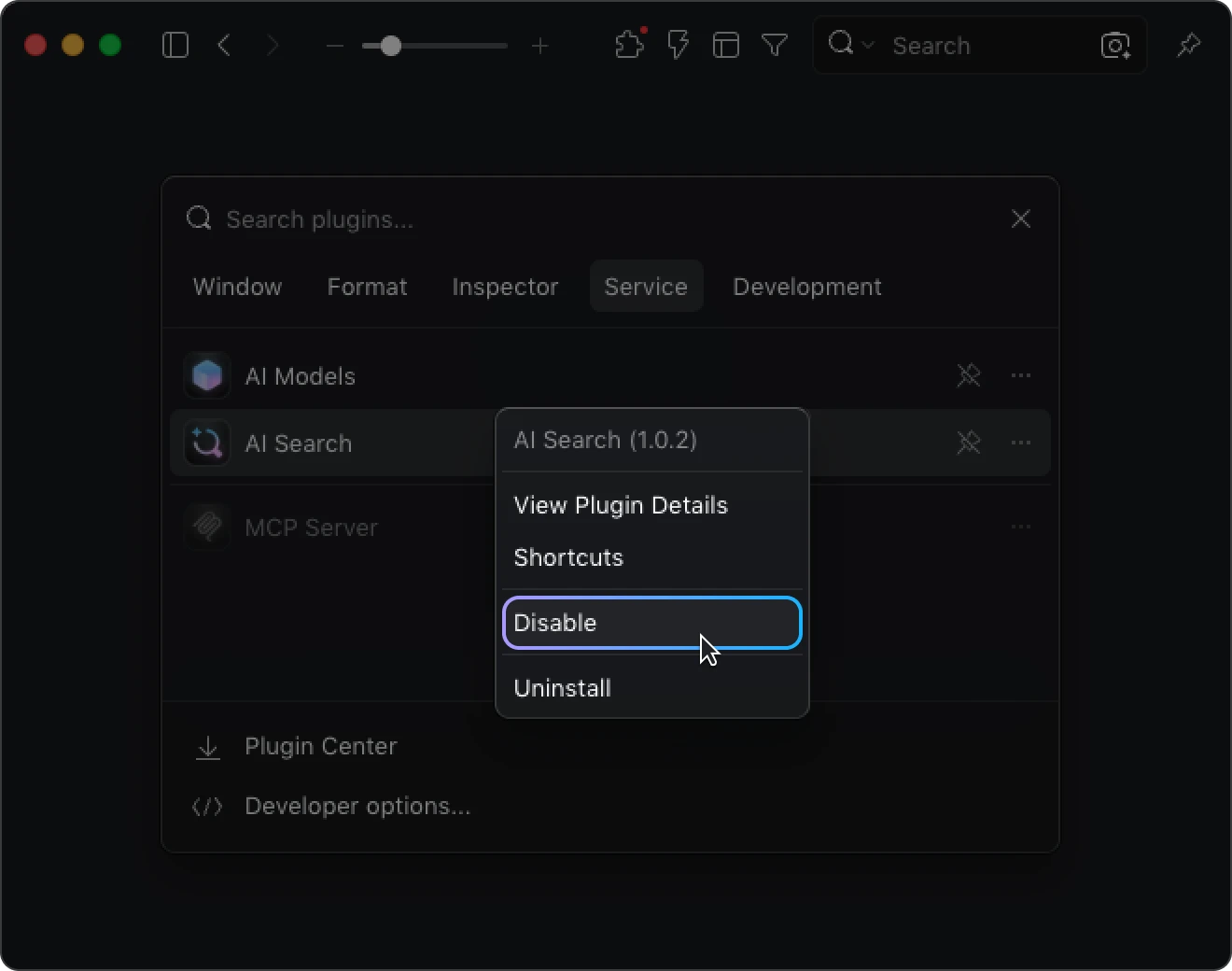
Disabled plugins appear in a grayed-out style, stop consuming system resources, and won't show up in the plugin menu. This makes plugin management much cleaner, especially if you have many plugins installed or frequently switch between different workflows.
You can manage plugin states from several places:
- Plugin Panel: Right-click any installed plugin to see the "Disable" or "Enable" option for quick toggling.
- Preferences: Service-type plugins (such as AI Search, AI Model Kit, and MCP Server) have their own toggle switches. When disabled, a prompt appears so you can re-enable them with a single click.
- Plugin Center: Installed plugins display different button labels based on their current state, so you can tell at a glance whether a plugin is active.
Whether you want to temporarily shut down a resource-heavy service plugin or quickly switch between different plugin combinations, this feature makes plugin management far more intuitive.
⚡ Performance Improvements
This update also includes several under-the-hood optimizations that make the overall experience smoother — especially when working with large images and animated files.
- GIF frame-by-frame parsing ~5× faster: We've rebuilt the GIF frame-by-frame player's parsing engine from the ground up. Large GIF files open noticeably faster, and scrubbing through frames feels significantly more responsive.
- Faster image color analysis: The color extraction algorithm has been optimized, resulting in quicker palette and color information generation when browsing large collections.
- Improved high-resolution image loading: Zooming and panning high-resolution images now feels smoother and more stable, with subtle tile-seam artifacts from previous versions resolved.
These improvements may not show up as visible UI changes, but you'll feel the difference every time you browse, preview, and organize your assets.
🐛 Bug Fixes
- Fixed an issue where Vimeo/YouTube video hover previews could occasionally crash the application
- Fixed thumbnail generation failing on Windows when adding files with the system hidden attribute
- Fixed incorrect thumbnail sizes for certain HEIC files on macOS due to parsing anomalies
🔮 AI Action Plugin Coming Soon
We've fully migrated the Action shortcut system to the new plugin architecture and completed the groundwork needed for the AI Action plugin launch.
The AI Action plugin, expected to launch next week, will let you trigger AI-powered actions with a single keyboard shortcut — turning multi-step operations into a streamlined, intuitive workflow.
Please note: The AI Action plugin requires Build 22 or later to function properly. If you plan to use AI-related features, we recommend updating Eagle to this version ahead of time.
👨💻 For Developers
This update also expands both the Plugin API and Web API, giving plugins, external tools, and automation workflows more complete access to Eagle's capabilities.
Plugin API
- New
followCursormanifest parameter: Plugin windows can now be configured to automatically appear at the cursor position — ideal for quick-action panels and similar use cases. - New Smart Folder API: Full CRUD support for smart folders, including filter rule management.
- New Comments API: Full CRUD support for image and video annotations.
Web API
- New Smart Folder API
- New Comments API
The Plugin API and Web API continue to align in capability, providing external tools with an increasingly complete interface for Eagle integration.
👉 Web API documentation: developer.eagle.cool/web-api
📥 How to Update
Build 22 is a minor update and won't trigger an automatic notification. To get the latest features right away, download the newest version from our website:
While this update doesn't include a major interface overhaul, the plugin enable/disable feature fills an important gap in plugin management, and the performance optimizations make everyday browsing and asset organization noticeably smoother.
The most exciting part, of course, is the upcoming AI Action plugin — triggering AI workflows with a single shortcut is about to become a reality. Stay tuned for next week's announcement.
Thanks for your support and feedback — see you in the next update!
Related Posts